
Fabrico · Sewing patterns, desktop software · International · 2026
The gap between the pattern and the printer
A sewing pattern is full size. A home printer is not.
- Timeline
- 1 week
- Goal
- Run it yourself
- Market
- International
1 week
to a shipped Windows installer
What was missing
Sewing patterns are designed at the size a person actually is. A skirt pattern, drawn correctly, is as large as a skirt. A coat pattern is as large as a coat. These are not small pieces of paper.
A home printer prints on A4. An A4 sheet is about the size of a notebook.
There has always been a gap between these two facts. The solution is tiling: cutting the large pattern into many small pieces, printing each piece on a separate sheet of paper, and gluing the sheets together until the original pattern appears. This is how every digital sewing pattern shop in the world delivers its products. It is also, when done badly, the reason a customer's finished trousers turn out to be the wrong size.
The shop had a tiling tool. It had been producing output where the pieces did not line up correctly. The seams between tiles were wrong. A tile that does not align by two millimetres produces a pattern that, when cut and sewn, produces a garment that fits nobody. The tool needed to be rebuilt.
The insight
The tiling problem and the upload problem looked like two separate things. They were not. A sewing pattern shop has two jobs: cut the pattern correctly, and put it in the right place in the shop so the right customer can buy it.
We built two tools. One for each job.
What we built
The desktop application
We rebuilt the tiling tool from the beginning, on a PDF engine called PyMuPDF. This engine clips and places PDF regions at a true one-to-one scale. Text stays as text. Cut lines stay as lines. Nothing is converted into a blurry image. The output is what was in the original file, placed precisely on each sheet, at exactly the correct size.
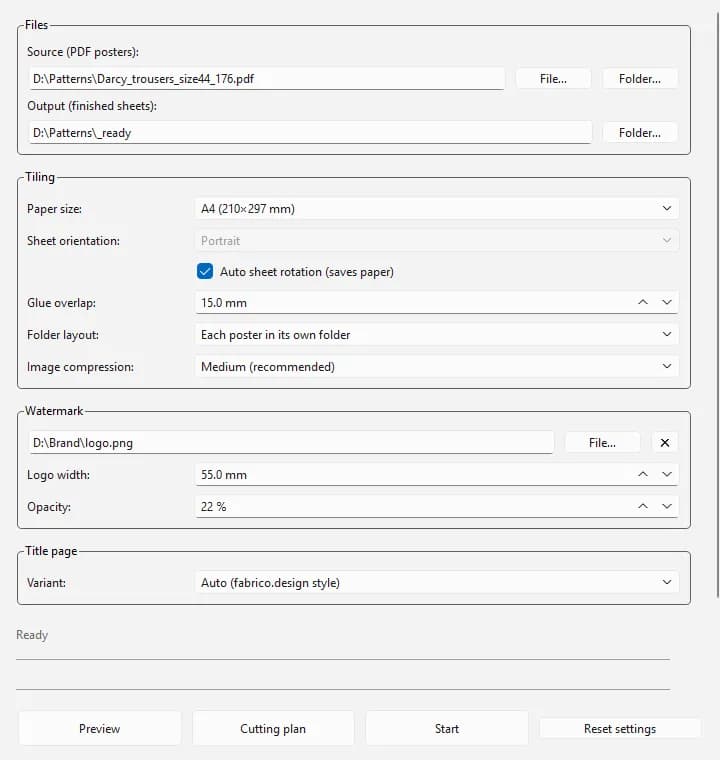
The application is one window. At the top, the user chooses a source folder and an output folder. Below that, paper size and the overlap margin. Then watermark options, then calibration page options. Everything the user chose last time is remembered when the application opens again.
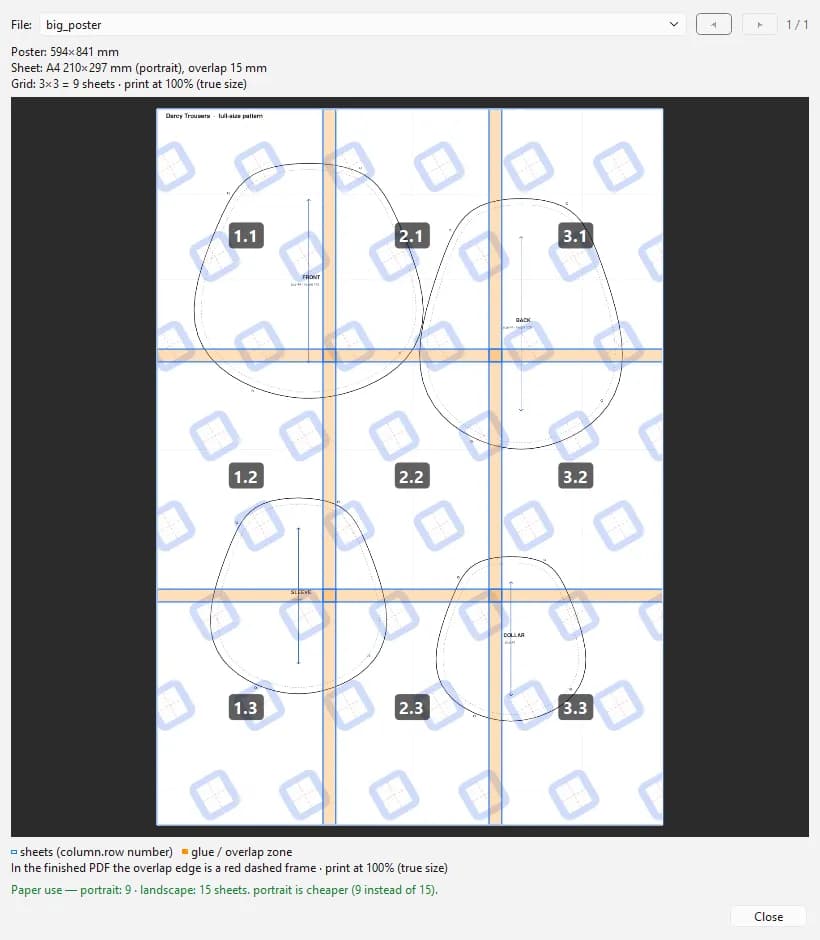
Before printing anything, the user can see a preview of the cut grid. Blue lines show where each sheet ends. Orange bands show the overlap zones where sheets will be glued. A bold number in the corner of each tile shows the assembly order. A pattern that produces a nine-sheet grid shows all nine tiles laid over the original image, before a single page is printed.
The application picks portrait or landscape orientation for each tile automatically, choosing whichever orientation uses fewer sheets. It reports how many sheets were saved by this choice. It processes whole folders of patterns in one batch, placing each pattern's output in its own subfolder. It handles heavy photographic poster files by compressing the image portions without touching the vector elements, reducing file sizes by up to 66%.
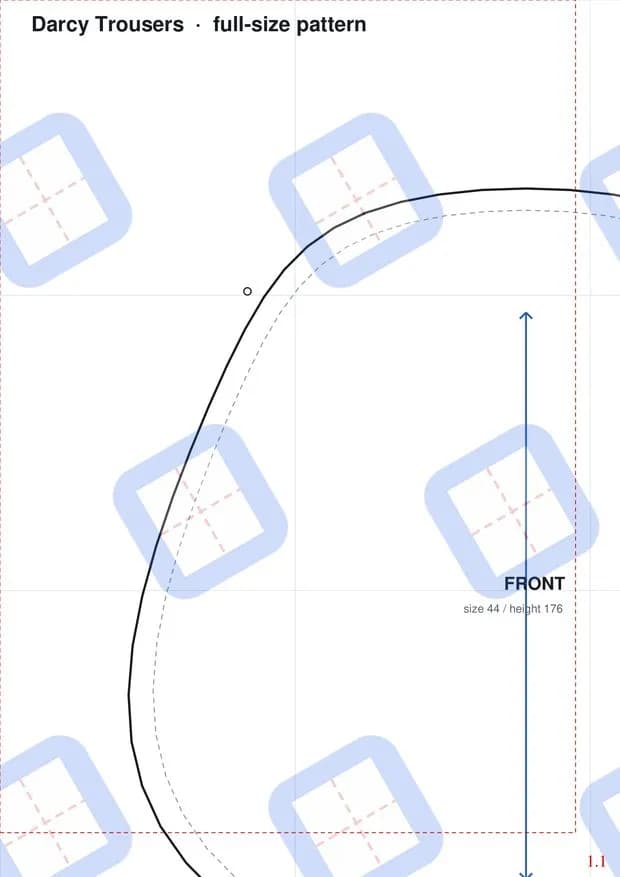
Every sheet of output carries a red dashed assembly rectangle, a bold column-and-row number in the corner, and a tiled watermark across the whole surface. These are the conventions that sewing pattern customers expect. A calibration title page, containing a ten-centimetre test square, can be attached to any output. The customer prints this page first, measures the square, and confirms the printer is working at true scale before cutting anything.
The application ships as a one-click installer for Windows. The user does not need Python. The user does not need any libraries. They run one installer and the application is ready.
The WooCommerce plugin
A sewing pattern shop sells each pattern in multiple sizes and multiple heights. A single pattern design might have thirty or forty combinations: size 36 at height 158, size 36 at height 176, size 38 at height 158, and so on through the full range. Each combination needs its own PDF file. Attaching these files to the right product variations, one by one, through the shop administration panel, takes a long time. We built a plugin that does it in one operation.
The plugin lives in the WordPress administration panel. The user searches for a product by name or code. They drag their finished pattern files into the upload area. Before committing to anything, they run a preview. The preview shows exactly which file will attach to which variation, without changing anything. When the result looks correct, they click upload. Files attach to variations automatically. Missing variations are created. If the same files are uploaded again, nothing is duplicated.
The logic that decides which file belongs to which variation is a single rule: a file belongs to a variation if every attribute from that variation appears in the filename. A file named Pattern-40-158-A4.pdf attaches to the variation for size 40, height 158, format A4. A file named Pattern-allsizes-176.pdf attaches to every variation at height 176, regardless of size, because allsizes is a wildcard. This one rule covers the entire catalogue. There are no special cases.
Files land in a protected folder inside WordPress. They are delivered only after purchase.
How we worked
The desktop application was built in approximately one week, from the first line of code to a shipped installer. The core engine, the preview system, the watermark, the calibration page, the batch pipeline, and the installer were all delivered in that time. The plugin followed, addressing the file-to-variation matching problem that the desktop tool had set aside.
Results
17 paper sizes supported, including ISO A and B series and US formats. 66% size reduction on heavy photographic poster files. One week from the beginning to a shipped Windows installer. Approximately 1,900 lines of application code. Approximately 1,300 lines across six focused plugin classes. Zero dependencies required on the customer's computer.
What the work included
Desktop application development, Windows installer, WooCommerce plugin development, PDF engineering
Stack
Tell us what's missing.
Thirty minutes. You describe the pain and the result you want. We ask questions. If we can help, you get one email with what we found, what we'd build and what it costs. If we can't, we'll say so.